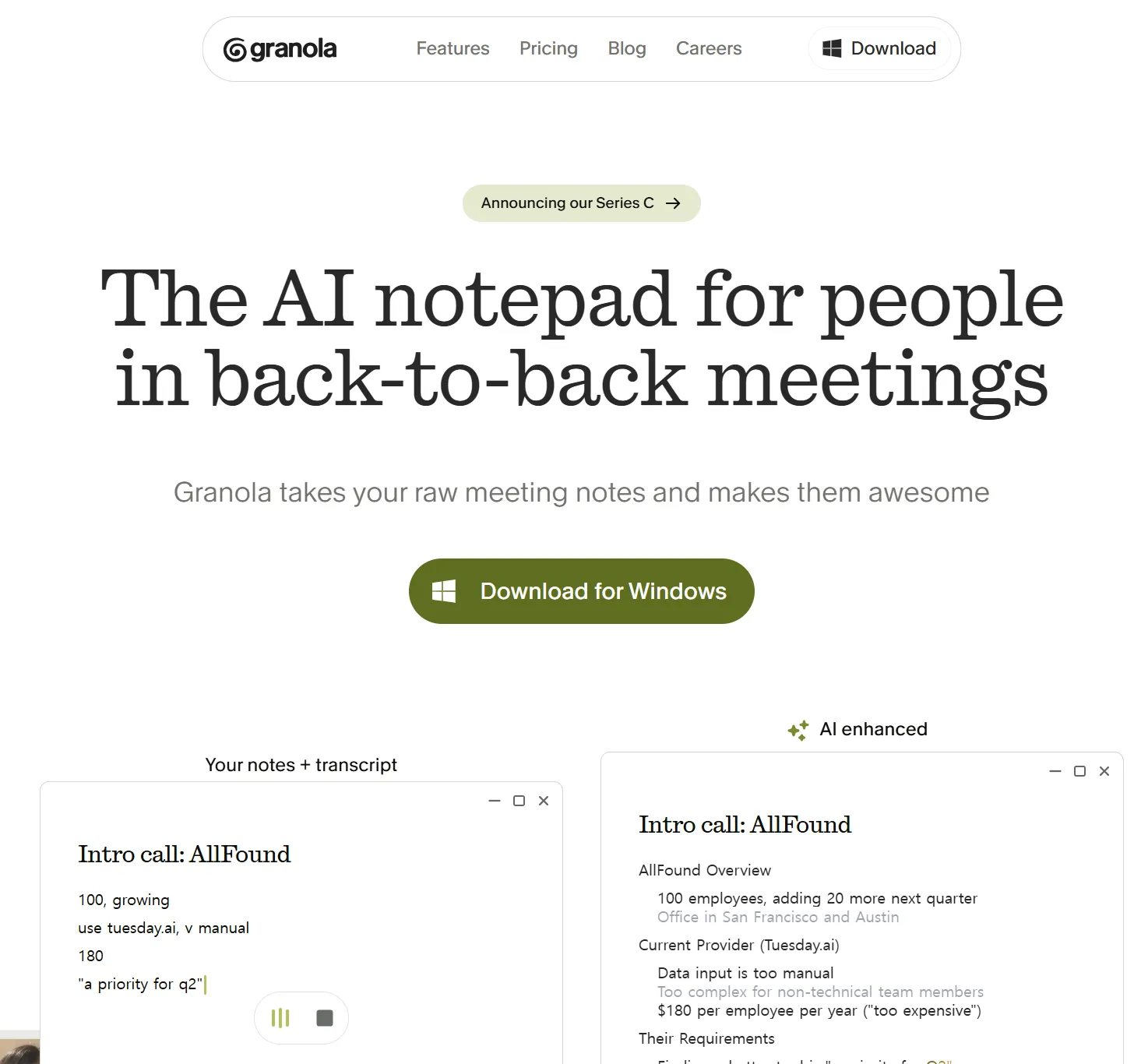
You're halfway through a critical investor call, furiously typing notes while trying to actually listen to what's being said. Sound familiar? Or maybe you've been in a situation where the AI bot that joined your meeting made the whole room feel like it was being interrogated. Granola AI was built to solve exactly these two problems — and the market has responded with extraordinary conviction. From a small London startup founded in 2023, Granola has grown to a $1.5 billion unicorn valuation in under three years, fueled almost entirely by word of mouth from the founders, VCs, and executives who discovered it first. This is the most comprehensive Granola AI guide you'll find anywhere — updated with the latest 2026 data.
1What Is Granola AI? The Bot-Free Revolution in Meeting Notes
Granola AI is, at its core, a bot-free AI meeting notepad. Traditional tools like Otter.ai, Fireflies, and Fathom record meetings by joining as a separate participant — which means attendees see an AI bot enter the call, which can feel intrusive and change the dynamics of sensitive conversations like HR discussions, sales calls, or executive strategy sessions.
Granola takes a fundamentally different approach. The app installs directly on your device — Mac, Windows, or iPhone — and captures system audio directly. It listens to the same audio that comes through your headphones or speakers. No bot joins. No participant list notification. No awkward "AI is now recording this meeting" announcement. Zoom, Google Meet, Microsoft Teams, Webex — it works with any video conferencing platform because it doesn't integrate with them at all.
💡 Granola's Core Philosophy: Human Judgment + AI Processing
This isn't just transcription. Granola's signature approach combines your judgment with AI processing power. During a meeting, you can jot quick notes in a minimal notepad. When the meeting ends, AI analyzes the full audio transcript using your notes as a guide. If you wrote "pricing concerns," Granola searches the entire transcript for every pricing discussion and adds rich context. Your notes remain in black text; AI additions appear in gray — so you always know what you wrote vs. what the AI added. The result is notes that are both comprehensive and focused on what actually mattered to you.
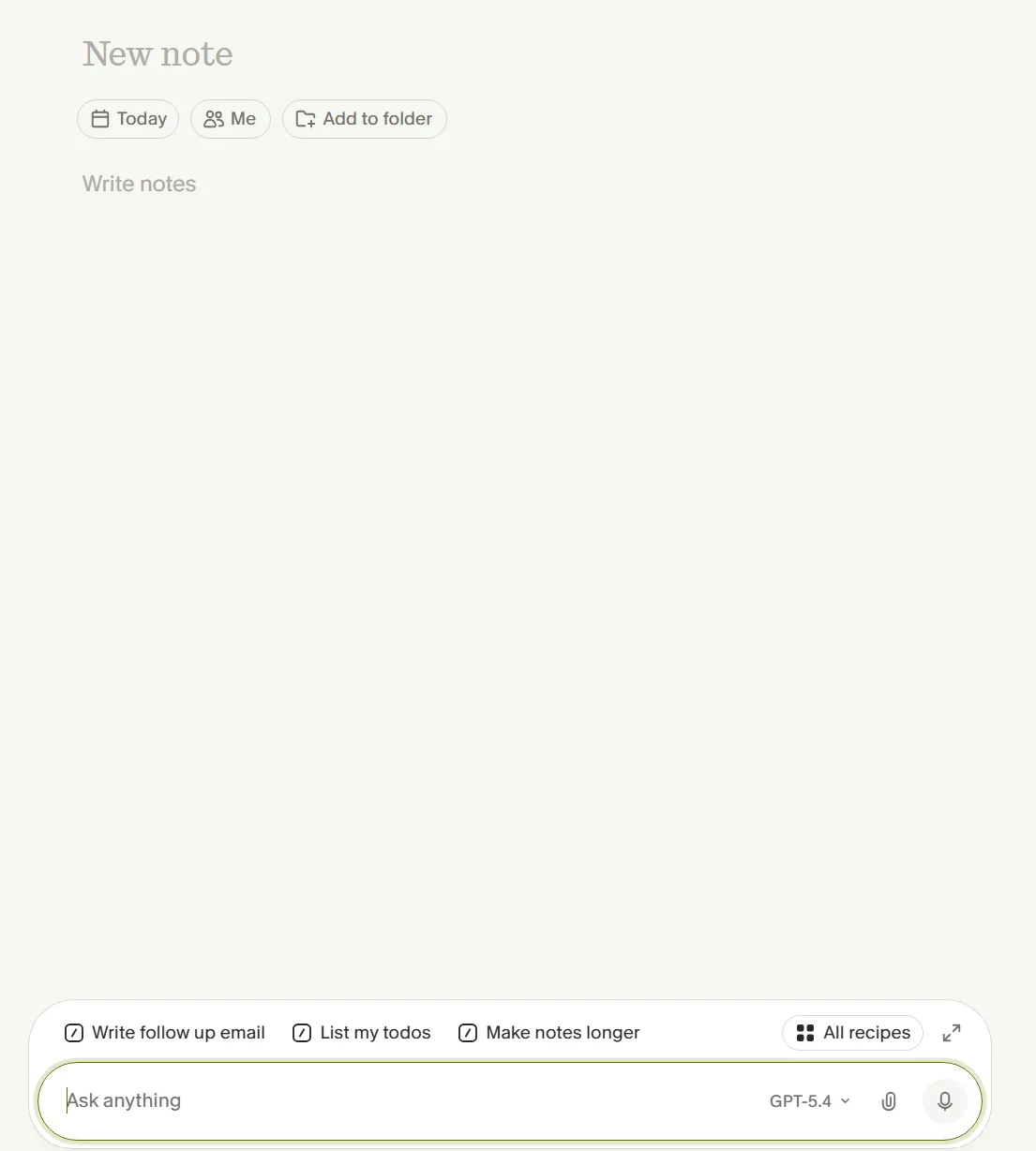
After the meeting, a single click on "Enhance Notes" produces a structured summary in seconds — with action items, key decisions, and next steps automatically extracted. The "Ask Granola" feature then lets you query your notes in natural language: "What were the main objections?" or "List all the action items assigned to Sarah." It's like having a personal search engine for your professional life.
This simple but powerful concept has driven Granola to grow 10% week-over-week since launch, almost entirely through word of mouth. Co-founder Chris Pedregal told TechCrunch: "People have Granola open all day because they have a lot of meetings, so it's like where they're starting to live."
"Granola is one of the best made 'AI' apps that I've used this year. If you are in a lot of meetings, this is a gamechanger. It takes notes in all those meetings for you, so you only need to add what's in your head. It's minimal, fast, with no setup. It. just. works." – @deedydas, Software Engineer on Twitter/X
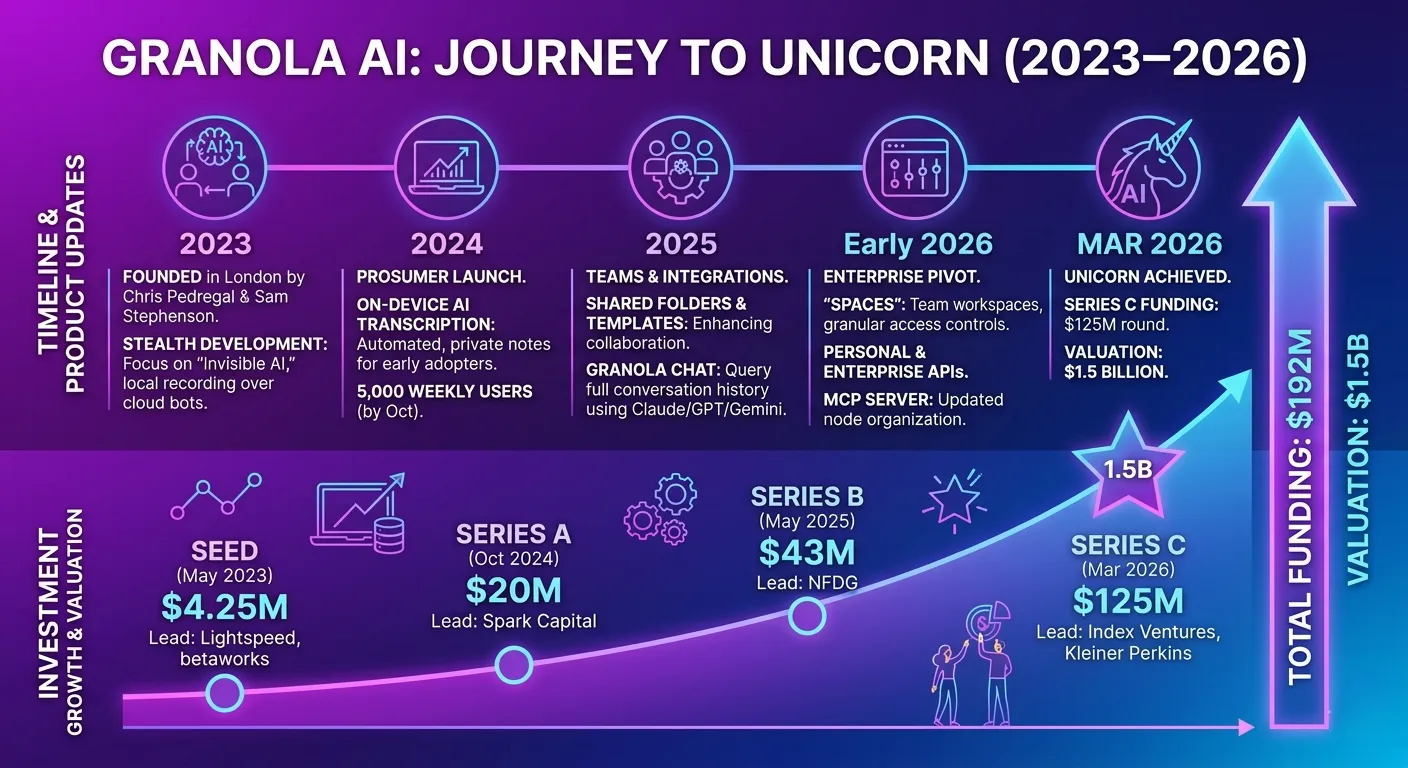
2The Founding Story & Funding History — A London Unicorn Is Born
Granola's story begins in March 2023 in London. Co-founder Chris Pedregal studied Computer Science at Stanford, then joined Google as a Product Manager working on Gmail, Search, and Maps. In 2013, he left to build Socratic, an AI-powered tutor for high school students that grew organically to over 10 million monthly active users and won Apple's "App of the Year" in 2017. Google acquired Socratic in 2018, where it now handles over four billion questions annually. That track record of building products people genuinely love is written all over Granola's DNA.
What makes the Series B investor roster particularly striking is who chose to put their own money in: CEOs and founders of Vercel, Shopify, Replit, Linear, Warp, and Ramp — all prolific meeting-heavy operators. They didn't invest because someone pitched them; they invested because they were already daily Granola users.
3Core Features Deep Dive — How It Actually Works
Granola's workflow follows a simple but powerful four-step loop: Capture → Transcribe → AI Enhance → Search & Share. Let's break down each feature in detail.
Bot-Free System Audio Capture
No participant added to your meeting. Granola captures audio directly from your device's system output — the same audio you hear through headphones. Works invisibly across Zoom, Meet, Teams, Webex, and phone calls.
Hybrid Human-AI Notes
An integrated notepad lets you jot keywords and quick thoughts during the meeting. These personal notes become the AI's guide — telling it what you found important — producing far more relevant output than pure transcription.
AI Note Enhancement
After the meeting, one click on "Enhance Notes" triggers AI analysis of the full transcript. Your notes stay in black; AI additions appear in gray. Structure, action items, and key decisions are extracted automatically.
Ask Granola (Chat with Notes)
Ask natural language questions about any meeting or folder of meetings. "What were the budget concerns in Monday's call?" or "List all open action items from this week's stand-ups." Sources are cited inline.
Folders & Shared Team Notes
Organize meeting notes into project-based, client-based, or team-based folders. Share folders with teammates so collective knowledge from every conversation becomes searchable organization-wide.
Automatic Slack Posting
The moment a meeting ends, a polished summary is auto-posted to your chosen Slack channel with a "Chat with this meeting" button. Route deal summaries to pipeline channels, feedback to product channels, and so on.
Calendar Integration
Connect Google Calendar and upcoming meetings auto-populate in Granola. Transcription can start automatically when a meeting begins — zero manual intervention required on your busiest days.
MCP & API Connectivity
Since February 2026, Granola's MCP server lets AI tools — Claude, ChatGPT, Figma Make, Replit, Bolt.new — pull meeting context directly. Personal API and Enterprise API give developers programmatic access to notes at scale.
⚡ Getting Started with Granola in Under 5 Minutes
-
Download & Install Visit granola.ai and download for macOS, Windows, or iOS. Create an account and you're ready to record in under 60 seconds. No configuration needed.
-
Connect Your Calendar (Optional) Link Google Calendar so upcoming meetings auto-populate. Granola can be set to start transcription automatically when a meeting begins.
-
Start Your Meeting — Just Listen Granola runs silently in the background. No one in the meeting knows it's there. Jot a few keywords if you like — they'll guide the AI — but you don't have to.
-
Click "Enhance Notes" After the meeting ends, click Enhance Notes. Within seconds, Granola returns a structured summary with action items, decisions, and next steps — ready to share.
-
Share, Search & Build Knowledge Share via URL or auto-post to Slack. Add to a shared folder so teammates can query the notes with AI. Your meetings become a searchable organizational memory.
Key Technical Point: Audio Is Deleted Immediately
Granola transcribes audio in real time, then deletes it. No audio files are stored anywhere — not on your device, not on Granola's servers. This architectural choice is why Granola achieved SOC 2 Type 2 certification in just 3 months (vs. the typical 12–18 month timeline). The trade-off: you cannot replay audio to verify a transcript. If that's critical for your workflow, you may want to consider a supplementary tool.
4Granola 2.0 & Latest Updates — Evolving Into a Team Workspace
On May 14, 2025 — the same day as the $43M Series B announcement — Granola 2.0 launched, marking a decisive shift from personal productivity tool to team intelligence platform.
As Chris Pedregal explained: "Since our launch a year ago, people have started referring to Granola as their 'second brain.' With Granola 2.0, we're bringing that power to your entire team, tapping into the most up-to-date, relevant data on what's happening in your company — the conversations your employees are having day in, day out."
Shared Folders
Team members contribute individual meeting notes into shared folders — Sales Calls, Customer Feedback, Hiring Loops, Board Updates. The folder becomes a living knowledge base queryable by any team member with access.
Cross-Meeting AI Search
"What are the top feature requests from enterprise customers this month?" Granola searches every meeting in a shared folder, identifies patterns, and cites the specific conversations that support its answer.
Shareable URLs with Inline Citations
Every meeting note gets a unique shareable URL. AI answers include jump-to-source links that navigate directly to the specific moment in the transcript where a piece of information came from.
Advanced Reasoning Models
Granola 2.0 enables support for higher-tier reasoning models from multiple AI providers, delivering deeper analysis for complex cross-meeting queries.
Slack Integration
One-time Slack connection; Granola auto-posts concise summaries the moment a call ends. Includes a "Chat with this meeting" button so anyone in the Slack channel can query the notes instantly.
Spaces (March 2026)
Launched alongside the Series C, Spaces are team workspaces with granular access controls. Create multiple folders within a Space; query them separately or together. Enterprise customers like Vanta, Gusto, Asana, and Mistral AI are already using Spaces.
🔥 The a16z Partner Incident — and How Granola Responded
An instructive episode: some power users — including an a16z general partner — had built on-device AI agent workflows that accessed Granola's local database. When Granola changed how it stored data, those workflows broke. The community pushback was swift. Pedregal acknowledged the problem directly: the local cache wasn't designed for AI agent workflows, and the change was unintentional. He publicly committed to launching APIs so users could access data in bulk — and delivered exactly that with the Series C announcement. The speed of response and transparency in handling the incident has only deepened user trust.
5Pricing Plans Analyzed — Is It Worth the Money?
Granola's pricing has evolved several times since launch. As of May 2026, there are three tiers:
| Plan | Price | Key Features | Best For |
|---|---|---|---|
| Free (Basic) Free | $0 | Unlimited meetings with AI transcription & note enhancement | Individuals with occasional meetings |
| Business Recommended | $14/user/mo | Shared folders, CRM integrations (HubSpot, Affinity, Attio), Zapier, Granola MCP, Slack auto-posting, advanced AI models, individual AI training opt-out | Teams, startups, sales & CS teams |
| Enterprise | $35+/user/mo | SSO, SCIM, org-wide AI training opt-out by default, usage analytics, Public API, SOC 2 Type 2, dedicated support, Heads Up feature (consent notification), Spaces | Large organizations, regulated industries |
📊 ROI Reality Check
If you run more than 10 substantive meetings per week, the Business plan at $14/month is easy to justify. Assume 20–30 minutes saved per meeting in note-writing and post-meeting organization. That's 3–5 hours per week reclaimed — at any professional hourly rate, that's orders of magnitude more valuable than the subscription cost. One reviewer put it bluntly: "I spend more than that on coffee in a week, and Granola has saved me exponentially more time than my espresso machine ever will." If you're a student, freelancer, or have fewer than 5 meetings a week, the free plan is genuinely sufficient for core needs.
One historical note for context: Granola previously had an Individual plan at $18/month and a Free tier limited to 25 lifetime meetings. Both have since been replaced — the free plan is now unlimited for core AI transcription and note enhancement, with premium features gated at the Business tier. This is a meaningful improvement that removes the artificial scarcity of the old model.
6Platform Compatibility & How to Get Started
Granola currently supports macOS, Windows (since June 2025), and iOS (since April 2025). There is no Android app and no web interface — a meaningful gap for some users.
macOS — The Home Platform
Where Granola was born and where it's most polished. A true native app — no Electron wrapper, no sluggishness. Apple Vision Pro is fully supported, making Granola one of the few apps to seriously embrace spatial computing for productivity.
Windows — Since June 2025
Fully functional for core transcription and AI note features. Some advanced features are still in beta. The Windows release was essential for Granola's enterprise ambitions — most large organizations run Windows fleets.
iOS — Since April 2025
Lock screen widget for one-tap recording. Perfect for in-person meetings, phone calls, and impromptu conversations on the go. Notes sync instantly to desktop. Vision Pro is also supported on the iOS app.
Desktop and mobile sync in real time — start a conversation capture on your iPhone during a walk, review and query the enhanced notes on your Mac when you return. There is no Microsoft Outlook calendar integration yet (only Google Calendar is supported), which has frustrated users in organizations standardized on Microsoft 365.
7Privacy & Security — Is Your Meeting Data Safe?
Entrusting sensitive business conversations to an AI service is not a decision to take lightly. Here's a clear-eyed look at Granola's security posture.
No Audio Storage — Ever
Audio is transcribed in real time and deleted immediately. No audio files exist anywhere after transcription. This is a core architectural choice, not just a policy — which is how they achieved SOC 2 Type 2 in just 3 months.
AWS Encryption & GDPR Compliance
Data is encrypted on AWS infrastructure. Granola provides a GDPR-compliant Data Processing Agreement. Third-party AI providers (OpenAI, Anthropic) are contractually prohibited from training on your data.
AI Training Opt-Out Controls
Business plan users can opt out of AI model training on their own data. Enterprise customers get organization-wide opt-out applied by default — no action required from individual users.
2025 Security Incidents & Response
A third-party key was accidentally exposed in the iOS beta app, making 333 beta user transcripts potentially accessible. Fixed the same day. Granola now runs automated credential scanning and has improved incident triage. macOS users were not affected. A separate issue with former employee account access was also resolved with periodic token checks.
An important legal note: Granola runs silently on your device — meeting participants typically won't know it's running. In US states with two-party consent laws (California, Florida, Illinois, etc.) and in many jurisdictions globally, recording or transcribing someone without their knowledge can be legally problematic. Granola's Enterprise plan includes a "Heads Up" feature (currently in pilot) that notifies meeting participants — this is the responsible approach for compliance-conscious organizations. Always check your local laws and inform participants transparently.
8Real User Reactions — Reddit, Product Hunt & Twitter
Numbers and features only tell part of the story. Here's what actual daily users are saying across the internet — the good and the bad.
🔍 Honest Criticism — Where Users Push Back
9Full Competitor Comparison — Otter.ai vs Fathom vs Fireflies vs tl;dv
The AI meeting notes market is crowded with capable players. Here's how Granola stacks up against the main alternatives across the dimensions that matter most.
| Feature | Granola 🏆 | Otter.ai | Fathom | Fireflies | tl;dv |
|---|---|---|---|---|---|
| Bot-Free Recording | ✅ | ❌ | ❌ | ❌ | ❌ |
| Free Plan | ✅ Unlimited | ✅ | ✅ Unlimited | ✅ | ✅ |
| macOS | ✅ Native | ✅ | ✅ | ✅ | ✅ |
| Windows | ⚠️ Beta | ✅ | ✅ | ✅ | ✅ |
| Android | ❌ | ✅ | ❌ | ✅ | ✅ |
| Audio Stored | ❌ Deleted | ✅ | ✅ | ✅ | ✅ |
| Audio Playback | ❌ | ✅ | ✅ | ✅ | ✅ |
| AI Note Quality | ✅ Excellent | ⚠️ Average | ✅ Good | ✅ Good | ✅ Good |
| Team Collaboration | ✅ Spaces | ✅ | ⚠️ Limited | ✅ | ✅ |
| CRM Integration | ✅ HubSpot, Affinity | ✅ | ⚠️ Limited | ✅ Salesforce | ✅ |
| MCP Support | ✅ Leading | ❌ | ❌ | ❌ | ❌ |
| Paid Plan Starting At | $14/user | $10/mo | $19/mo | $10/mo | $20/mo |
Which Tool Should You Choose?
- 🎙️ Privacy is non-negotiable, no bots under any circumstances → Granola
- 💸 Need unlimited free + audio playback/verification → Fathom
- 📊 Deep CRM integration (Salesforce) is the primary need → Fireflies or Krisp
- 🤖 Building AI agent workflows with Claude / ChatGPT / Replit → Granola (MCP leader)
- 🌏 100+ language support & persistent speaker identification across meetings → Jamie
10Pros, Cons & Final Verdict
✅ What Granola Nails
- Completely invisible bot-free recording
- Superior AI note quality (human-guided)
- Apple-level UI polish and intentional design
- Zero audio storage = strong privacy by design
- Granola 2.0 team collaboration features
- MCP support — leading the AI workflow integration race
- macOS, Windows, iOS multi-platform
- Auto Slack posting with chat capability
- Apple Vision Pro support
- 10% weekly user growth — extraordinary organic demand
⚠️ What Needs Work
- No audio playback for verification
- Speaker ID limited to "Me" and "Them" on desktop
- No Android app
- No Microsoft Outlook calendar integration
- Windows version still partly in beta
- Non-English transcription accuracy needs improvement
- 2025 iOS beta security incidents (resolved)
- Relatively few third-party reviews on G2/Capterra
📊 Scorecard
🎯 Bottom Line — Who Should Use Granola?
Granola is the clear leader for PMs, sales executives, consultants, founders, researchers, and anyone who spends more than 10 hours a week in meetings. If the presence of a recording bot changes the dynamic of your conversations — whether with clients, candidates, or executives — Granola's invisible, device-based approach is uniquely valuable. The $1.5B valuation, backed by Index Ventures and Kleiner Perkins, isn't just financial validation; it's a signal that the world's most discerning tech investors believe this is how enterprise knowledge management will work in the future. Granola isn't without gaps — Android users, Outlook-heavy organizations, and those who need audio playback will feel constrained. But for Mac + Google Workspace environments, it's the most complete, most elegant solution in the market today. Try it free at granola.ai — one meeting in, and you'll understand why no one goes back.
"There is just an incredible amount of customer love for this product. Before Granola there were plenty of note taking products, and there will be many after. But no one takes better notes than Granola + you." – Nabeel Hyatt, General Partner, Spark Capital
Final Thoughts — Stop Taking Notes. Start Having Conversations.
Meetings aren't going away — if anything, the proliferation of remote and hybrid work has made them more frequent. The question isn't how to survive the volume; it's how to stop letting note-taking rob you of the quality of attention you give to the person across the table (or screen). Granola's premise is simple: presence is a competitive advantage. When you're not scrambling to capture every detail, you hear the hesitation behind someone's words, you ask the follow-up that changes the deal, you build the trust that a distracted note-taker never could.
Start for free at granola.ai — and see what happens when you give your meetings your full attention. 🎙️